

Fast, One-ClickKoken Hosting
CMS for photographers, designers and artists to showcase work. Install Koken in one click with the Softaculous installer on cPanel NVMe hosting: LiteSpeed, free SSL, daily backups and 24×7 support. From ₹129.00/mo billed triennially.
1-Click Koken
Live in minutes
NVMe + LiteSpeed
Fast page loads
Free SSL & Backups
Secure by default
cPanel NVMe Hosting Plans for Koken
Pick a server region and a plan, then install Koken from Softaculous in one click. Prices are live from our billing system.
Starter
First site, blogs, portfolios
- 10 GB NVMe Storage (RAID1)
- 1 Website
- 1 GB RAM · 1 core
- Unlimited bandwidth, email & MySQL
- Free Let's Encrypt SSL & free migration
- LiteSpeed Enterprise + LSCache
- Imunify360 · KernelCare · CageFS
- Daily JetBackup backups
- cPanel · Softaculous (400+ apps)
- 24×7 support · 99.99% uptime
Smart
Small business, a few projects
- 30 GB NVMe Storage (RAID1)
- 5 Websites
- 2 GB RAM · 2 cores
- Unlimited bandwidth, email & MySQL
- Free Let's Encrypt SSL & free migration
- LiteSpeed Enterprise + LSCache
- Imunify360 · KernelCare · CageFS
- Daily JetBackup backups
- cPanel · Softaculous (400+ apps)
- 24×7 support · 99.99% uptime
Business
Agencies and growing stores
- 75 GB NVMe Storage (RAID1)
- 25 Websites
- 3 GB RAM · 3 cores
- Unlimited bandwidth, email & MySQL
- Free Let's Encrypt SSL & free migration
- LiteSpeed Enterprise + LSCache
- Imunify360 · KernelCare · CageFS
- Daily JetBackup backups
- cPanel · Softaculous (400+ apps)
- 24×7 support · 99.99% uptime
Enterprise
High-traffic, large portfolios
- 150 GB NVMe Storage (RAID1)
- Unlimited Websites
- 6 GB RAM · 4 cores
- Unlimited bandwidth, email & MySQL
- Free Let's Encrypt SSL & free migration
- LiteSpeed Enterprise + LSCache
- Imunify360 · KernelCare · CageFS
- Daily JetBackup backups
- cPanel · Softaculous (400+ apps)
- 24×7 support · 99.99% uptime
Every plan runs on enterprise NVMe storage in RAID1 with per-account CloudLinux limits. Prices are pre-GST with no setup fee; the same plans and prices apply in India, France, Poland, Canada and Singapore. 30-day money-back guarantee.
What is Koken?
Koken is a content management system made for photographers, designers and artists to present their work, with a desktop-style management interface and point-and-click site building. Its last release, 0.22.24, dates from 2017. Its original creators recently regained control of it, but have announced no relaunch plans.
Project status: Softaculous lists version 0.22.24 from July 2017 as the latest. A May 2026 blog post by the original creators says they regained the assets from the defunct company that had acquired Koken, but have no plans yet to relaunch it. The official site koken.me could not be loaded (expired certificate). We list it because it is still available in the Softaculous installer; consider an actively maintained alternative for new projects.
Licence: Free (as listed by Softaculous) · Built with: PHP + MySQL · Official site: koken.me
Common uses
- Photography portfolio websites
- Maintaining an existing Koken site
- Artist and designer showcase sites
Koken requirements
- Database: MySQL, per the project's official Docker image description
- Project's Docker image targets PHP 5, indicating a legacy PHP era
The project's official Docker image targets PHP 5 with MySQL, so compatibility with current PHP versions is not documented and may need testing. Given the software's age, use caution for public sites.
Why host Koken with Hostripples
- One-click Koken install from Softaculous inside cPanel, with no manual upload or database setup
- All-NVMe storage and LiteSpeed Enterprise with LSCache for quick page loads
- Selectable PHP versions per site and CloudLinux account isolation with CageFS
- Free SSL, daily JetBackup backups and Imunify360 malware protection
- Free migration of an existing Koken site, and 24×7 support in English, Hindi and Marathi
Koken features
What Koken offers
Desktop-style management
The management interface is described as feeling like a desktop application.
Live site building
Sites are built point-and-click with real-time preview.
Theme customisation
Colours, layout and typefaces are edited through a floating panel.
Media embeds
Images, videos and slideshows are supported, plus embeds from services such as Flickr, Vimeo and SoundCloud.
Draft mode
Changes can be kept in draft separately from the live site.
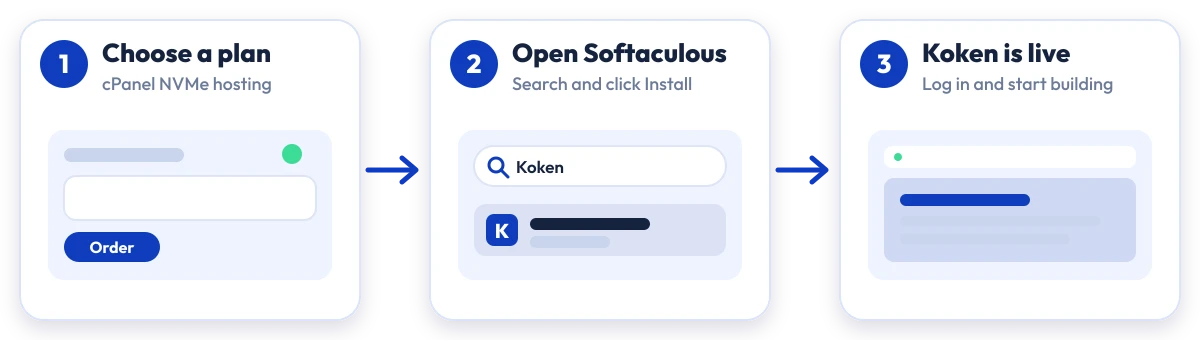
Install Koken in four steps
No manual upload or database setup: Softaculous does it from your cPanel.

Plan
Choose a cPanel NVMe plan and server region

cPanel
Log in to cPanel and open Softaculous Apps Installer

Install
Search for Koken, click Install and fill in the form

Launch
Open your new Koken site and start building
Compare with other apps
People who look at Koken often compare it with:
More Portal / CMS you can install in one click:
Koken Hosting: Frequently Asked Questions
Everything you need to know
Still have questions?
Our support team is live 24/7 in English, Hindi & Marathi.
Ready to launch Koken?
Pick a cPanel NVMe plan and install Koken in one click. Free SSL, free migration and 24×7 support included.