

Fast, One-ClickphpMyAdmin Hosting
Web-based administration tool for MySQL and MariaDB written in PHP. Install phpMyAdmin in one click with the Softaculous installer on cPanel NVMe hosting: LiteSpeed, free SSL, daily backups and 24×7 support. From ₹129.00/mo billed triennially.
1-Click phpMyAdmin
Live in minutes
NVMe + LiteSpeed
Fast page loads
Free SSL & Backups
Secure by default
cPanel NVMe Hosting Plans for phpMyAdmin
Pick a server region and a plan, then install phpMyAdmin from Softaculous in one click. Prices are live from our billing system.
Starter
First site, blogs, portfolios
- 10 GB NVMe Storage (RAID1)
- 1 Website
- 1 GB RAM · 1 core
- Unlimited bandwidth, email & MySQL
- Free Let's Encrypt SSL & free migration
- LiteSpeed Enterprise + LSCache
- Imunify360 · KernelCare · CageFS
- Daily JetBackup backups
- cPanel · Softaculous (400+ apps)
- 24×7 support · 99.99% uptime
Smart
Small business, a few projects
- 30 GB NVMe Storage (RAID1)
- 5 Websites
- 2 GB RAM · 2 cores
- Unlimited bandwidth, email & MySQL
- Free Let's Encrypt SSL & free migration
- LiteSpeed Enterprise + LSCache
- Imunify360 · KernelCare · CageFS
- Daily JetBackup backups
- cPanel · Softaculous (400+ apps)
- 24×7 support · 99.99% uptime
Business
Agencies and growing stores
- 75 GB NVMe Storage (RAID1)
- 25 Websites
- 3 GB RAM · 3 cores
- Unlimited bandwidth, email & MySQL
- Free Let's Encrypt SSL & free migration
- LiteSpeed Enterprise + LSCache
- Imunify360 · KernelCare · CageFS
- Daily JetBackup backups
- cPanel · Softaculous (400+ apps)
- 24×7 support · 99.99% uptime
Enterprise
High-traffic, large portfolios
- 150 GB NVMe Storage (RAID1)
- Unlimited Websites
- 6 GB RAM · 4 cores
- Unlimited bandwidth, email & MySQL
- Free Let's Encrypt SSL & free migration
- LiteSpeed Enterprise + LSCache
- Imunify360 · KernelCare · CageFS
- Daily JetBackup backups
- cPanel · Softaculous (400+ apps)
- 24×7 support · 99.99% uptime
Every plan runs on enterprise NVMe storage in RAID1 with per-account CloudLinux limits. Prices are pre-GST with no setup fee; the same plans and prices apply in India, France, Poland, Canada and Singapore. 30-day money-back guarantee.
What is phpMyAdmin?
phpMyAdmin is a free, open-source web tool written in PHP for administering MySQL and MariaDB databases. It offers a graphical interface for everyday tasks such as managing tables, users and permissions, and can also run raw SQL. It is developed by community volunteers and is a member of the Software Freedom Conservancy.
Licence: GPL-2.0 · Built with: PHP · Official site: www.phpmyadmin.net
Common uses
- Browsing and editing a website database
- Importing or exporting database backups
- Managing database users and permissions
phpMyAdmin requirements
- PHP: PHP 7.2.5 or newer per the current documentation, with session, SPL, hash, ctype and JSON support
- Database: MySQL 5.5+ / MariaDB 5.5+
- Browser supporting cookies and JavaScript
- Recommended: mbstring, zip, GD2, openssl and curl extensions
It runs on standard PHP with MySQL or MariaDB access, so it needs no special server privileges. The project recommends the mbstring, zip, GD2 and openssl PHP extensions for full functionality.
Why host phpMyAdmin with Hostripples
- One-click phpMyAdmin install from Softaculous inside cPanel, with no manual upload or database setup
- All-NVMe storage and LiteSpeed Enterprise with LSCache for quick page loads
- Selectable PHP versions per site and CloudLinux account isolation with CageFS
- Free SSL, daily JetBackup backups and Imunify360 malware protection
- Free migration of an existing phpMyAdmin site, and 24×7 support in English, Hindi and Marathi
phpMyAdmin features
What phpMyAdmin offers
Full database management
Create and manage databases, tables, fields, relations, indexes, users and permissions.
Import and export
Import CSV and SQL, and export to formats including CSV, SQL, XML and PDF.
Raw SQL
Execute SQL statements directly, alongside a graphical interface.
Global search
Search across databases, tables and columns.
Multi-server administration
Manage more than one MySQL server from one interface.
Query-by-example
Build queries visually without writing SQL by hand.
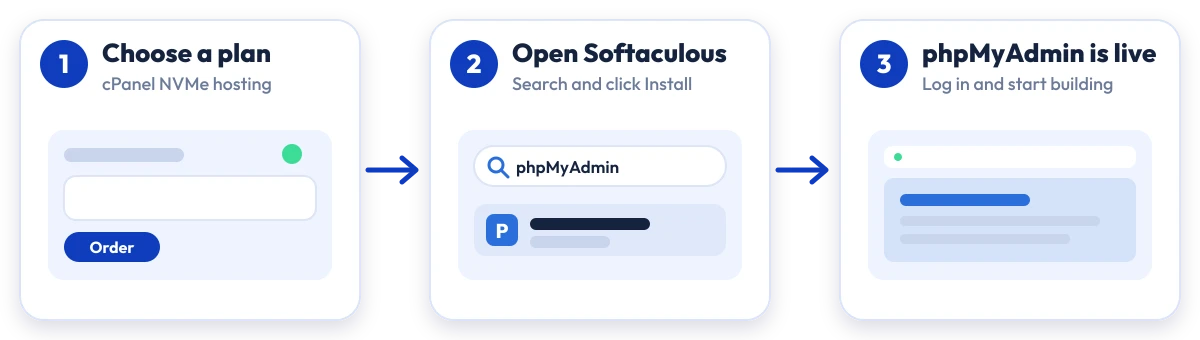
Install phpMyAdmin in four steps
No manual upload or database setup: Softaculous does it from your cPanel.

Plan
Choose a cPanel NVMe plan and server region

cPanel
Log in to cPanel and open Softaculous Apps Installer

Install
Search for phpMyAdmin, click Install and fill in the form

Launch
Open your new phpMyAdmin site and start building
Compare with other apps
People who look at phpMyAdmin often compare it with:
More Database Tools you can install in one click:
phpMyAdmin Hosting: Frequently Asked Questions
Everything you need to know
Still have questions?
Our support team is live 24/7 in English, Hindi & Marathi.
Ready to launch phpMyAdmin?
Pick a cPanel NVMe plan and install phpMyAdmin in one click. Free SSL, free migration and 24×7 support included.