

Fast, One-ClickKanboard Hosting
Free open-source Kanban project management software in PHP. Install Kanboard in one click with the Softaculous installer on cPanel NVMe hosting: LiteSpeed, free SSL, daily backups and 24×7 support. From ₹129.00/mo billed triennially.
1-Click Kanboard
Live in minutes
NVMe + LiteSpeed
Fast page loads
Free SSL & Backups
Secure by default
cPanel NVMe Hosting Plans for Kanboard
Pick a server region and a plan, then install Kanboard from Softaculous in one click. Prices are live from our billing system.
Starter
First site, blogs, portfolios
- 10 GB NVMe Storage (RAID1)
- 1 Website
- 1 GB RAM · 1 core
- Unlimited bandwidth, email & MySQL
- Free Let's Encrypt SSL & free migration
- LiteSpeed Enterprise + LSCache
- Imunify360 · KernelCare · CageFS
- Daily JetBackup backups
- cPanel · Softaculous (400+ apps)
- 24×7 support · 99.99% uptime
Smart
Small business, a few projects
- 30 GB NVMe Storage (RAID1)
- 5 Websites
- 2 GB RAM · 2 cores
- Unlimited bandwidth, email & MySQL
- Free Let's Encrypt SSL & free migration
- LiteSpeed Enterprise + LSCache
- Imunify360 · KernelCare · CageFS
- Daily JetBackup backups
- cPanel · Softaculous (400+ apps)
- 24×7 support · 99.99% uptime
Business
Agencies and growing stores
- 75 GB NVMe Storage (RAID1)
- 25 Websites
- 3 GB RAM · 3 cores
- Unlimited bandwidth, email & MySQL
- Free Let's Encrypt SSL & free migration
- LiteSpeed Enterprise + LSCache
- Imunify360 · KernelCare · CageFS
- Daily JetBackup backups
- cPanel · Softaculous (400+ apps)
- 24×7 support · 99.99% uptime
Enterprise
High-traffic, large portfolios
- 150 GB NVMe Storage (RAID1)
- Unlimited Websites
- 6 GB RAM · 4 cores
- Unlimited bandwidth, email & MySQL
- Free Let's Encrypt SSL & free migration
- LiteSpeed Enterprise + LSCache
- Imunify360 · KernelCare · CageFS
- Daily JetBackup backups
- cPanel · Softaculous (400+ apps)
- 24×7 support · 99.99% uptime
Every plan runs on enterprise NVMe storage in RAID1 with per-account CloudLinux limits. Prices are pre-GST with no setup fee; the same plans and prices apply in India, France, Poland, Canada and Singapore. 30-day money-back guarantee.
What is Kanboard?
Kanboard is a free, open-source Kanban project management application distributed under the MIT licence. Development is led by Frédéric Guillot with community contributions. It shows tasks on drag-and-drop boards with work-in-progress limits, subtasks, comments and automated actions, and is designed to stay simple to install and use.
Licence: MIT · Built with: PHP (SQLite, MySQL/MariaDB or PostgreSQL) · Official site: kanboard.org
Common uses
- Team Kanban board for daily work
- Personal or freelancer task tracking
- Small software team sprint boards
- Simple agency project overview
Kanboard requirements
- PHP: PHP 8.1 or higher
- Database: SQLite 3.7+, MySQL 5.6+, MariaDB 10+ or PostgreSQL 9.4+
- PHP extensions: gd, mbstring, openssl, json, hash, ctype, session, filter, xml, SimpleXML, dom, plus a pdo database driver
- Optional: zip, ldap, curl
- Docs say it is not compatible with mod_security
It needs PHP 8.1 or higher with common extensions and can use SQLite or MySQL/MariaDB, which fits cPanel with selectable PHP versions. The docs note it is incompatible with mod_security.
Why host Kanboard with Hostripples
- One-click Kanboard install from Softaculous inside cPanel, with no manual upload or database setup
- All-NVMe storage and LiteSpeed Enterprise with LSCache for quick page loads
- Selectable PHP versions per site and CloudLinux account isolation with CageFS
- Free SSL, daily JetBackup backups and Imunify360 malware protection
- Free migration of an existing Kanboard site, and 24×7 support in English, Hindi and Marathi
Kanboard features
What Kanboard offers
Kanban boards
Visualise work in columns with drag-and-drop and work-in-progress limits.
Tasks and subtasks
Tasks support subtasks, attachments and comments with Markdown.
Automated actions
Rule-based automation moves and updates tasks.
Swimlanes and Gantt
Boards support swimlanes, and projects can show Gantt charts.
Analytics
Cumulative flow and burndown charts are included.
Authentication options
Supports LDAP and several OAuth2 providers.
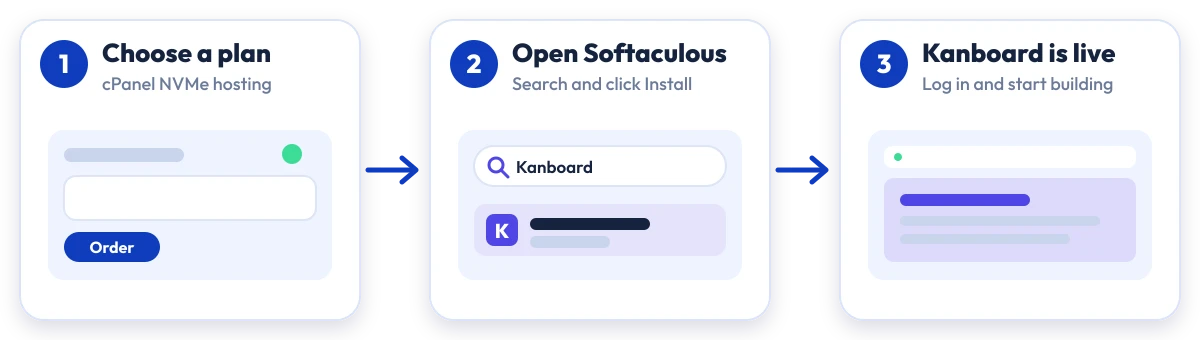
Install Kanboard in four steps
No manual upload or database setup: Softaculous does it from your cPanel.

Plan
Choose a cPanel NVMe plan and server region

cPanel
Log in to cPanel and open Softaculous Apps Installer

Install
Search for Kanboard, click Install and fill in the form

Launch
Open your new Kanboard site and start building
Compare with other apps
People who look at Kanboard often compare it with:
More Project Management you can install in one click:
Kanboard Hosting: Frequently Asked Questions
Everything you need to know
Still have questions?
Our support team is live 24/7 in English, Hindi & Marathi.
Ready to launch Kanboard?
Pick a cPanel NVMe plan and install Kanboard in one click. Free SSL, free migration and 24×7 support included.