

Fast, One-ClickPhpGedView Hosting
Legacy PHP genealogy web application for family trees (GEDCOM). Install PhpGedView in one click with the Softaculous installer on cPanel NVMe hosting: LiteSpeed, free SSL, daily backups and 24×7 support. From ₹129.00/mo billed triennially.
1-Click PhpGedView
Live in minutes
NVMe + LiteSpeed
Fast page loads
Free SSL & Backups
Secure by default
cPanel NVMe Hosting Plans for PhpGedView
Pick a server region and a plan, then install PhpGedView from Softaculous in one click. Prices are live from our billing system.
Starter
First site, blogs, portfolios
- 10 GB NVMe Storage (RAID1)
- 1 Website
- 1 GB RAM · 1 core
- Unlimited bandwidth, email & MySQL
- Free Let's Encrypt SSL & free migration
- LiteSpeed Enterprise + LSCache
- Imunify360 · KernelCare · CageFS
- Daily JetBackup backups
- cPanel · Softaculous (400+ apps)
- 24×7 support · 99.99% uptime
Smart
Small business, a few projects
- 30 GB NVMe Storage (RAID1)
- 5 Websites
- 2 GB RAM · 2 cores
- Unlimited bandwidth, email & MySQL
- Free Let's Encrypt SSL & free migration
- LiteSpeed Enterprise + LSCache
- Imunify360 · KernelCare · CageFS
- Daily JetBackup backups
- cPanel · Softaculous (400+ apps)
- 24×7 support · 99.99% uptime
Business
Agencies and growing stores
- 75 GB NVMe Storage (RAID1)
- 25 Websites
- 3 GB RAM · 3 cores
- Unlimited bandwidth, email & MySQL
- Free Let's Encrypt SSL & free migration
- LiteSpeed Enterprise + LSCache
- Imunify360 · KernelCare · CageFS
- Daily JetBackup backups
- cPanel · Softaculous (400+ apps)
- 24×7 support · 99.99% uptime
Enterprise
High-traffic, large portfolios
- 150 GB NVMe Storage (RAID1)
- Unlimited Websites
- 6 GB RAM · 4 cores
- Unlimited bandwidth, email & MySQL
- Free Let's Encrypt SSL & free migration
- LiteSpeed Enterprise + LSCache
- Imunify360 · KernelCare · CageFS
- Daily JetBackup backups
- cPanel · Softaculous (400+ apps)
- 24×7 support · 99.99% uptime
Every plan runs on enterprise NVMe storage in RAID1 with per-account CloudLinux limits. Prices are pre-GST with no setup fee; the same plans and prices apply in India, France, Poland, Canada and Singapore. 30-day money-back guarantee.
What is PhpGedView?
PhpGedView is a PHP genealogy application that lets you view and edit family trees on your own website using GEDCOM files. It was created by John Finlay in 2002 and was forked in 2010 to create webtrees. Its last stable release, 4.3.0, appeared in 2017 and the project is no longer actively developed.
Project status: The last stable release, 4.3.0, dates from November 2017 (Softaculous lists 5 November 2017; Wikipedia gives 7 November 2017). The PhpGedView project wiki describes it as stable but stagnant with no base of programmers working on it, and recommends the webtrees fork instead. We list it because it is still available in the Softaculous installer; consider an actively maintained alternative for new projects.
Licence: GPL-2.0-or-later · Built with: PHP + MySQL · Official site: sourceforge.net/projects/phpgedview
Common uses
- Maintaining an existing legacy family-tree site
- Keeping an older GEDCOM website running
PhpGedView requirements
- Database: MySQL (version not stated in the pages read)
PhpGedView is a PHP and MySQL application, but its last release is from 2017, so it may not run on current PHP versions and receives no security fixes. Most new genealogy sites should use the actively maintained webtrees instead.
Why host PhpGedView with Hostripples
- One-click PhpGedView install from Softaculous inside cPanel, with no manual upload or database setup
- All-NVMe storage and LiteSpeed Enterprise with LSCache for quick page loads
- Selectable PHP versions per site and CloudLinux account isolation with CageFS
- Free SSL, daily JetBackup backups and Imunify360 malware protection
- Free migration of an existing PhpGedView site, and 24×7 support in English, Hindi and Marathi
PhpGedView features
What PhpGedView offers
GEDCOM import
Family tree data can be imported from GEDCOM files.
Online editing
Genealogy data can be viewed and edited through a website.
Privacy controls
The Softaculous listing mentions full editing and privacy controls.
Multimedia support
Photos and documents can be attached to records.
Statistics and charts
Statistics and charting options are available.
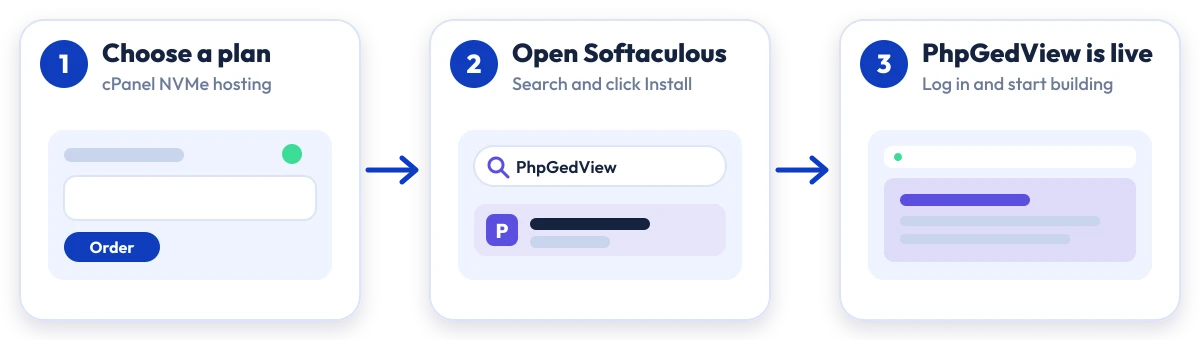
Install PhpGedView in four steps
No manual upload or database setup: Softaculous does it from your cPanel.

Plan
Choose a cPanel NVMe plan and server region

cPanel
Log in to cPanel and open Softaculous Apps Installer

Install
Search for PhpGedView, click Install and fill in the form

Launch
Open your new PhpGedView site and start building
Compare with other apps
People who look at PhpGedView often compare it with:
More Others you can install in one click:
PhpGedView Hosting: Frequently Asked Questions
Everything you need to know
Still have questions?
Our support team is live 24/7 in English, Hindi & Marathi.
Ready to launch PhpGedView?
Pick a cPanel NVMe plan and install PhpGedView in one click. Free SSL, free migration and 24×7 support included.