

Fast, One-ClickOmeka Hosting
Open-source web publishing platform for digital collections and exhibits. Install Omeka in one click with the Softaculous installer on cPanel NVMe hosting: LiteSpeed, free SSL, daily backups and 24×7 support. From ₹129.00/mo billed triennially.
1-Click Omeka
Live in minutes
NVMe + LiteSpeed
Fast page loads
Free SSL & Backups
Secure by default

cPanel NVMe Hosting Plans for Omeka
Pick a server region and a plan, then install Omeka from Softaculous in one click. Prices are live from our billing system.
Starter
First site, blogs, portfolios
- 10 GB NVMe Storage (RAID1)
- 1 Website
- 1 GB RAM · 1 core
- Unlimited bandwidth, email & MySQL
- Free Let's Encrypt SSL & free migration
- LiteSpeed Enterprise + LSCache
- Imunify360 · KernelCare · CageFS
- Daily JetBackup backups
- cPanel · Softaculous (400+ apps)
- 24×7 support · 99.99% uptime
Smart
Small business, a few projects
- 30 GB NVMe Storage (RAID1)
- 5 Websites
- 2 GB RAM · 2 cores
- Unlimited bandwidth, email & MySQL
- Free Let's Encrypt SSL & free migration
- LiteSpeed Enterprise + LSCache
- Imunify360 · KernelCare · CageFS
- Daily JetBackup backups
- cPanel · Softaculous (400+ apps)
- 24×7 support · 99.99% uptime
Business
Agencies and growing stores
- 75 GB NVMe Storage (RAID1)
- 25 Websites
- 3 GB RAM · 3 cores
- Unlimited bandwidth, email & MySQL
- Free Let's Encrypt SSL & free migration
- LiteSpeed Enterprise + LSCache
- Imunify360 · KernelCare · CageFS
- Daily JetBackup backups
- cPanel · Softaculous (400+ apps)
- 24×7 support · 99.99% uptime
Enterprise
High-traffic, large portfolios
- 150 GB NVMe Storage (RAID1)
- Unlimited Websites
- 6 GB RAM · 4 cores
- Unlimited bandwidth, email & MySQL
- Free Let's Encrypt SSL & free migration
- LiteSpeed Enterprise + LSCache
- Imunify360 · KernelCare · CageFS
- Daily JetBackup backups
- cPanel · Softaculous (400+ apps)
- 24×7 support · 99.99% uptime
Every plan runs on enterprise NVMe storage in RAID1 with per-account CloudLinux limits. Prices are pre-GST with no setup fee; the same plans and prices apply in India, France, Poland, Canada and Singapore. 30-day money-back guarantee.
What is Omeka?
Omeka Classic is a free, open-source web publishing platform for displaying library, museum, archive and scholarly collections online. It is maintained by the Corporation for Digital Scholarship and released under the GNU General Public License. Cultural institutions and researchers use it to catalogue items with Dublin Core metadata and build online exhibits.
Licence: GPL-3.0 · Built with: PHP + MySQL · Official site: omeka.org/classic
Common uses
- Museum or archive online collection
- University digital humanities project
- Local history society photo archive
- Library special-collections exhibit
Omeka requirements
- PHP: PHP 7.1 or higher for Omeka Classic 3.2 (3.2.1 documented as supporting up to PHP 8.5)
- Database: MySQL 5.5.5 or higher
- PHP mysqli and exif extensions
- ImageMagick for image resizing
- Apache with mod_rewrite (per official docs)
- Some plugins may add requirements, e.g. poppler-utils for PDF text
Omeka Classic is a PHP and MySQL application that also needs the mysqli and exif extensions and ImageMagick for image resizing, so check those are enabled on the account. The official requirements name Apache with mod_rewrite.
Why host Omeka with Hostripples
- One-click Omeka install from Softaculous inside cPanel, with no manual upload or database setup
- All-NVMe storage and LiteSpeed Enterprise with LSCache for quick page loads
- Selectable PHP versions per site and CloudLinux account isolation with CageFS
- Free SSL, daily JetBackup backups and Imunify360 malware protection
- Free migration of an existing Omeka site, and 24×7 support in English, Hindi and Marathi
Omeka features
What Omeka offers
Item and metadata management
Collections of items are described with Dublin Core metadata and can include files such as images and documents.
Online exhibits
Non-programmers can assemble media-rich exhibits from catalogued items.
Plugins and themes
Plugins add functions such as mapping, tagging and blogging, and themes change how the site looks.
Visitor participation
Its Web 2.0 approach allows visitors to interact with collections, for example through tags.
Batch import and sharing
Data can be imported in batches and shared using standard metadata formats.
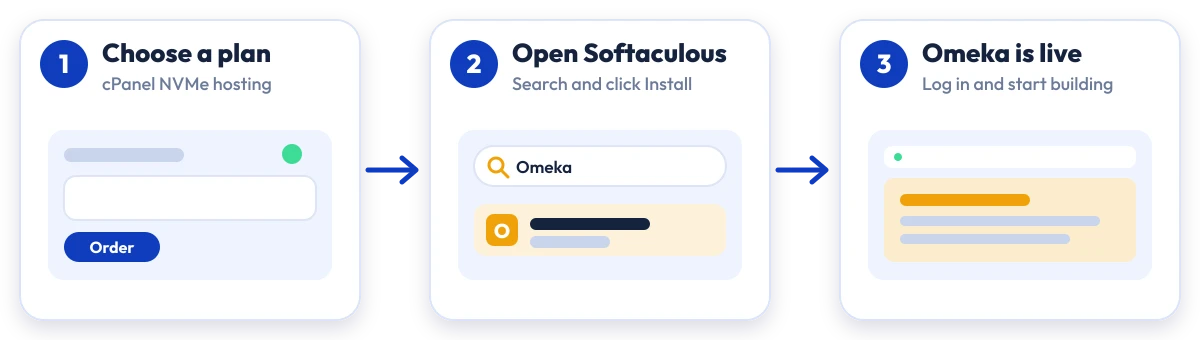
Install Omeka in four steps
No manual upload or database setup: Softaculous does it from your cPanel.

Plan
Choose a cPanel NVMe plan and server region

cPanel
Log in to cPanel and open Softaculous Apps Installer

Install
Search for Omeka, click Install and fill in the form

Launch
Open your new Omeka site and start building
Compare with other apps
People who look at Omeka often compare it with:
More Educational you can install in one click:
Omeka Hosting: Frequently Asked Questions
Everything you need to know
Still have questions?
Our support team is live 24/7 in English, Hindi & Marathi.
Ready to launch Omeka?
Pick a cPanel NVMe plan and install Omeka in one click. Free SSL, free migration and 24×7 support included.